How to Build an Ultra-Clean Desk Cable Management System
By ADLTHUB · July 23, 2026
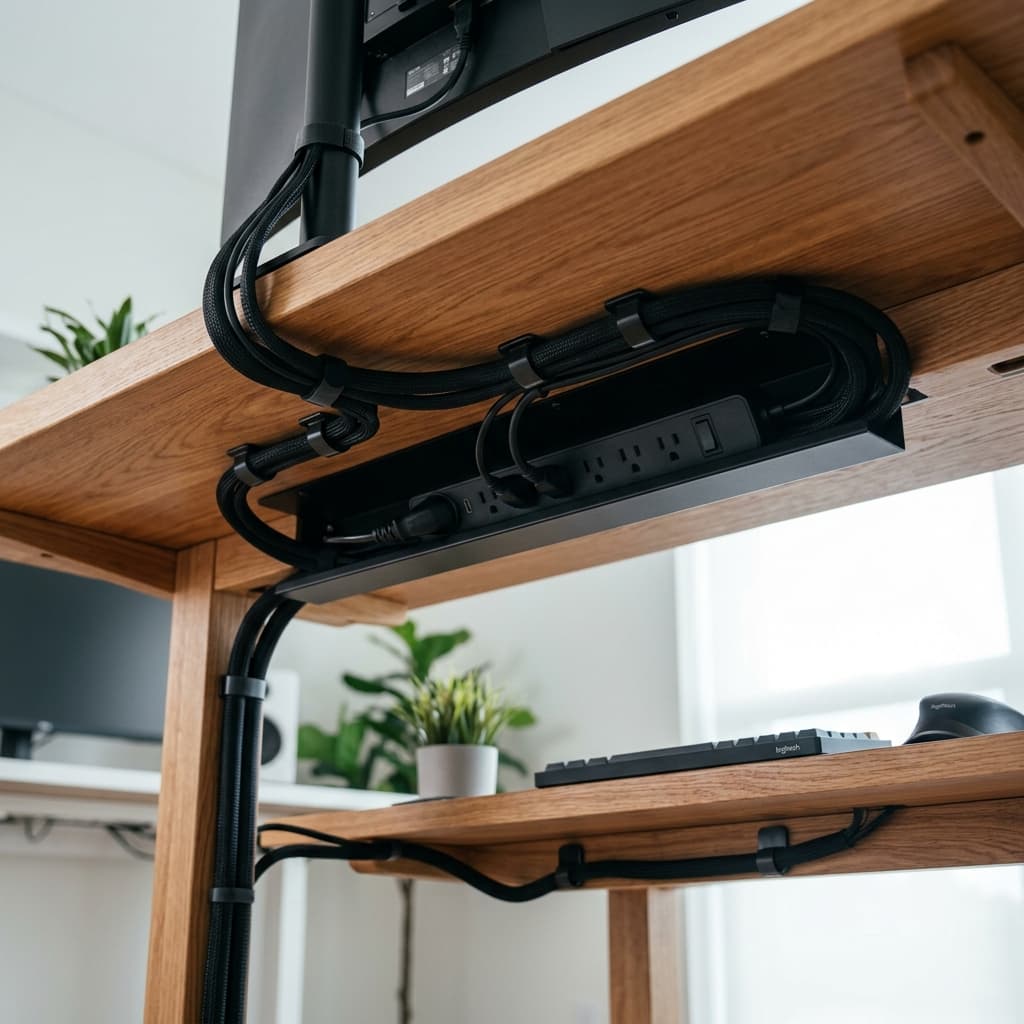
A messy workspace with tangled wires creates unnecessary mental clutter and visual noise. Learning how to organize desk cables properly transforms your workspace into an inviting, high-efficiency environment.
1. Mount Power Strips Under Your Desk
Attaching a surge protector power tray underneath your desk surface keeps power bricks off the floor and out of sight.
2. Group Cables with Braided Sleeves & Velcro Straps
Bundle loose monitor, power, and peripheral cables into clean braided sleeves. Avoid plastic zip ties which can pinch and damage cords over time.
3. Use Magnetic Cable Anchors on Desk Edges
Keep frequently used charging cables (USB-C, Lightning, MagSafe) anchored to desk edges with magnetic clips so they never slip down behind your desk.
4. Position Wireless Chargers & Docking Stations Centrally
Route all major data lines into a single central docking hub, leaving only one main umbilical cable running down to the wall outlet.
Upgrade your desk organization with ADLTHUB Tech Accessories.